The `textures_delta` in `AppRunner::logic()` comes from
`TextureManager::take_delta()` via `end_pass()`. Previously, if
`is_visible` was `false`, these deltas would have been dropped and never
applied, so the `TextureManager` state gets out of sync with the
`Renderer`.

That causes https://github.com/emilk/egui/issues/8228: When the app is
loaded in a background tab and the first frame occurs via the
`setTimeout` path prior to the tab becoming visible, it loses the
`ImageDelta` representing the initial creation of the font atlas
texture. When the user then switches to the tab, it panics at
crates/egui-wgpu/src/renderer.rs:669:18 with `Tried to update a texture
that has not been allocated yet` when attempting to update the texture
that the wgpu renderer never saw when it was created.

Testing: To make it load in a background tab, put `data:text/html,<a
href=http://127.0.0.1:8765/>Click</a>` in the address bar and then
middle click the resulting link. On Chrome you also have to hover the
tab preview before switching to the tab to reproduce the issue.

<!--
Please read the "Making a PR" section of
[`CONTRIBUTING.md`](https://github.com/emilk/egui/blob/main/CONTRIBUTING.md)
before opening a Pull Request!

* Keep your PR:s small and focused.
* The PR title is what ends up in the changelog, so make it descriptive!
* If applicable, add a screenshot or gif.
* If it is a non-trivial addition, consider adding a demo for it to
`egui_demo_lib`, or a new example.
* Do NOT open PR:s from your `master` branch, as that makes it hard for
maintainers to test and add commits to your PR.
* Remember to run `cargo fmt` and `cargo clippy`.
* Open the PR as a draft until you have self-reviewed it and run
`./scripts/check.sh`.
* When you have addressed a PR comment, mark it as resolved.

Please be patient! I will review your PR, but my time is limited!
-->

* Closes <https://github.com/emilk/egui/issues/8228> and its duplicate
https://github.com/emilk/egui/issues/8278
* [x] I have followed the instructions in the PR template

Co-authored-by: Emil Ernerfeldt <emil.ernerfeldt@gmail.com>
* Closes <https://github.com/emilk/egui/issues/8295>
* [x] I have followed the instructions in the PR template

When an eframe app is embedded in a scrollable host page, the host page
jumped to the top whenever the app booted or grabbed keyboard focus.
Cause: the hidden text-agent `<input>` sat at (0,0) of `<body>` with the
`autofocus` attribute, and all focus calls (text agent and canvas) used
plain `focus()`, so the browser scrolled the focused element into view —
i.e. to the top of the page.

Changes:

* All focus calls in `eframe` web (text agent, canvas, Gboard
blur/refocus workaround) now go through a new `focus_without_scroll()`
helper that uses `focus_with_options` with `preventScroll: true`
(supported by all evergreen browsers).
* The `autofocus` attribute is replaced with an explicit focus call
after DOM insertion — the browser-internal autofocus path always scrolls
the element into view and cannot be prevented by any focus option.
Boot-focus behavior is preserved.
* The text-agent input is initially parked at the canvas origin instead
of (0,0) of the page, so any residual scroll-into-view would target the
canvas rather than the top of the host page. (`move_to` keeps
repositioning it for IME as before.)

🤖 Generated with [Claude Code](https://claude.com/claude-code)

Co-authored-by: Claude Fable 5 <noreply@anthropic.com>
<!--
Please read the "Making a PR" section of
[`CONTRIBUTING.md`](https://github.com/emilk/egui/blob/main/CONTRIBUTING.md)
before opening a Pull Request!

* Keep your PR:s small and focused.
* The PR title is what ends up in the changelog, so make it descriptive!
* If applicable, add a screenshot or gif.
* If it is a non-trivial addition, consider adding a demo for it to
`egui_demo_lib`, or a new example.
* Do NOT open PR:s from your `master` branch, as that makes it hard for
maintainers to test and add commits to your PR.
* Remember to run `cargo fmt` and `cargo clippy`.
* Open the PR as a draft until you have self-reviewed it and run
`./scripts/check.sh`.
* When you have addressed a PR comment, mark it as resolved.

Please be patient! I will review your PR, but my time is limited!
-->

* [X] I have followed the instructions in the PR template

This PR adds a `remove_string()` API to the Storage trait and also
implements it in the `FileStorage` and `LocalStorage` stucts.
## What
Adds a way for apps to push an RGBA bitmap as the OS cursor — the
missing companion to `Context::set_cursor_icon`. The integration
translates it into a real `winit::CustomCursor`, so the cursor is drawn
by the compositor and can extend past the egui window edge like any
native cursor.
## Why
Apps with custom-shaped windows (Winamp-style skins, themed launchers,
kiosk apps) currently have no clean way to display a custom cursor:
- `CursorIcon` is limited to the standard system enum.
- Painting the cursor sprite via `egui::Painter` works inside the canvas
but gets clipped at the window edge — the bottom/right of the cursor
disappears the moment the pointer is near the boundary, and there's no
way to render onto the desktop area exposed by a
transparent/region-shaped window.
`winit` 0.30+ already supports `CustomCursor::from_rgba` +
`ActiveEventLoop::create_custom_cursor`, but `egui-winit` doesn't
surface it. This PR exposes it through egui.
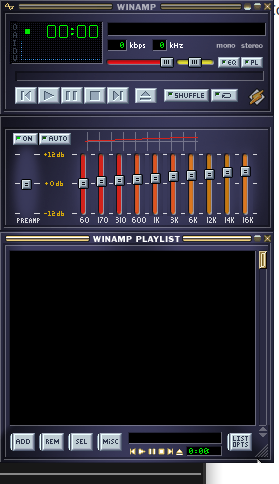
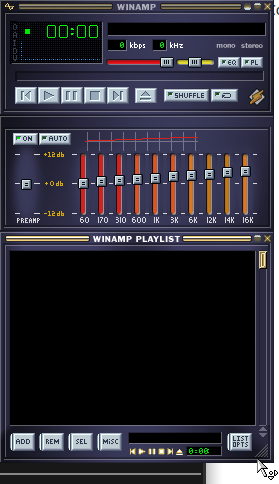
### Visual demonstration
Driving use case: a Winamp WSZ skin player
([all3f0r1/oneamp](https://github.com/all3f0r1/oneamp)) with a
transparent + region-shaped window where the skin ships its own `.cur`
files. The bottom-right corner of the playlist exposes the resize cursor
— notice how it gets clipped at the window edge in the painter-based
approach.
| Before (cursor painted via `egui::Painter`) | After (cursor pushed via
`set_cursor_image`) |
| --- | --- |
| 
| 
|
## API
```rust
// new in egui::data::output
pub struct CustomCursorImage {
pub rgba: std::sync::Arc<[u8]>,
pub size: [u16; 2], // matches winit's u16 to avoid lossy casts
pub hotspot: [u16; 2],
}
// new field on PlatformOutput (skipped from serde — ephemeral)
pub cursor_image: Option<CustomCursorImage>,
// new method on Context
ctx.set_cursor_image(Some(image)); // overrides cursor_icon for this frame
ctx.set_cursor_image(None); // revert to cursor_icon
```
`Arc<[u8]>` is intentional: the integration dedupes by `Arc::as_ptr`, so
reusing the same Arc across frames means the bitmap is only uploaded to
the OS once per skin, not once per frame.
## Integration changes
- `egui_winit::State::handle_platform_output_with_event_loop(window,
Option<&ActiveEventLoop>, ...)` is a new method that threads the active
event loop so it can call `event_loop.create_custom_cursor(...)`.
- The legacy `handle_platform_output(window, ...)` delegates with `None`
and silently drops `cursor_image`. **No existing callers break.**
- The icon and bitmap paths are unified in a private `apply_cursor`. The
no-flicker dedupe of the old `set_cursor_icon` is preserved on both
paths.
- If `CustomCursor::from_rgba` rejects the bitmap (bad dimensions,
hotspot OOB, etc.), we log a warning and fall back to the icon path.
- eframe's wgpu + glow integrations thread `&ActiveEventLoop` through
`run_ui_and_paint` (glow already had it; wgpu needed one extra
parameter) and call the new method.
- Immediate viewports keep the old path because they're invoked from a
`Context` callback that doesn't have an event loop reference. Custom
cursors are a no-op in immediate viewports — acceptable since they're a
niche path.
## Fallback semantics
| backend / context | what happens |
|--------------------------------|-------------------------------|
| eframe wgpu/glow main viewport | bitmap displayed via OS |
| eframe immediate viewport | falls back to `cursor_icon` |
| eframe web | falls back to `cursor_icon` |
| custom integrations not opted in | falls back to `cursor_icon` |
| `from_rgba` returns `BadImage` | warning + falls back to icon |
## Verification
- `cargo fmt --all -- --check` ✅
- `cargo clippy -p egui -p egui-winit -p eframe --all-targets
--all-features -- -D warnings` ✅
- `cargo doc --lib --no-deps -p egui -p egui-winit -p eframe
--all-features` ✅
- `cargo check -p egui --no-default-features --features serde` ✅
(validates the `serde(skip)` on `cursor_image`)
- Interactive validation on Linux/Wayland with the OneAmp WSZ skin
player — see screenshots above.
I haven't run the full snapshot test suite (`scripts/check.sh`) because
we're on Linux and the snapshots are macOS-rendered — happy to run it if
you'd like.
## Notes
Drafted per the contributing guide ("open a draft PR, you may get
helpful feedback early"). Open to design feedback on:
1. Whether `CustomCursorImage` should live in `egui::viewport` rather
than `egui::data::output`.
2. Whether the legacy `handle_platform_output` should grow `event_loop`
directly (breaking) instead of getting a sibling method (non-breaking,
what I did).
3. Whether to also wire it through eframe-web (probably not —
`wasm-bindgen-cursor` would need its own path).
---------
Co-authored-by: Claude Opus 4.7 (1M context) <noreply@anthropic.com>
<!--
Please read the "Making a PR" section of
[`CONTRIBUTING.md`](https://github.com/emilk/egui/blob/main/CONTRIBUTING.md)
before opening a Pull Request!

* Keep your PR:s small and focused.
* The PR title is what ends up in the changelog, so make it descriptive!
* If applicable, add a screenshot or gif.
* If it is a non-trivial addition, consider adding a demo for it to
`egui_demo_lib`, or a new example.
* Do NOT open PR:s from your `master` branch, as that makes it hard for
maintainers to test and add commits to your PR.
* Remember to run `cargo fmt` and `cargo clippy`.
* Open the PR as a draft until you have self-reviewed it and run
`./scripts/check.sh`.
* When you have addressed a PR comment, mark it as resolved.

Please be patient! I will review your PR, but my time is limited!
-->

This improves cases where the canvas does not cover the full screen,
which was a goal in [release
0.28.0](https://github.com/emilk/egui/releases/tag/0.28.0).

* Closes <https://github.com/emilk/egui/issues/8035>
* [X] I have followed the instructions in the PR template
* Part of https://github.com/emilk/egui/issues/5113
* Part of https://github.com/emilk/egui/issues/3524

## What
This deprecates `eframe::App::update` and replaces it with two new
functions:

```rs
pub trait App {
	/// Called just before `ui`, and in the future this will
    /// also be called for background apps when needed.
	fn logic(&mut self, ctx: &egui::Context, frame: &mut Frame) { }

    /// Show your user interface to the user.
	fn ui(&mut self, ui: &mut egui::Ui, frame: &mut Frame);

	…
}
```

Similarly, `Context::run` is deprecated in favor of `Context::run_ui`.

`Plugin`s are now handed a `Ui` instead of just a `Context` in
`on_begin/end_frame`.

## TODO
…either in this PR or a later one
* [x] Deprecate `App::update`
* [x] Deprecate `Context::run`
* [x] Change plugins to get a `Ui`
* [x] Update kittest
* [x] Change viewports to get UI:s (`show_viewport_immediate` etc)
  - https://github.com/emilk/egui/pull/7779

## Later PRs
* [ ] Deprecate `Panel::show`
* [ ] Deprecate `CentralPanel::show`
* [ ] Deprecate `CentralPanel` ?
* Closes https://github.com/emilk/egui/issues/5889

See the above issue for motivation.

To use glow instead, disable the default features of `eframe` and opt-in
to `glow`.

This also changes egui.rs to use wgpu, which means WebGPU when
available, and WebGL otherwise
* Part of https://github.com/emilk/egui/issues/5889
* Closes https://github.com/emilk/egui/issues/7106

This changes the `eframe/wgpu` feature to also enable all the `default`
features of `wgpu` and `egui-wgpu`. This makes switching `eframe`
backend from `glow` to `wgpu` a lot easier.

To get the old behavior (depend on `wgpu` but you must opt-in to all its
features), use the new `wgpu_no_default_features` feature.
<!--
Please read the "Making a PR" section of
[`CONTRIBUTING.md`](https://github.com/emilk/egui/blob/master/CONTRIBUTING.md)
before opening a Pull Request!

* Keep your PR:s small and focused.
* The PR title is what ends up in the changelog, so make it descriptive!
* If applicable, add a screenshot or gif.
* If it is a non-trivial addition, consider adding a demo for it to
`egui_demo_lib`, or a new example.
* Do NOT open PR:s from your `master` branch, as that makes it hard for
maintainers to test and add commits to your PR.
* Remember to run `cargo fmt` and `cargo clippy`.
* Open the PR as a draft until you have self-reviewed it and run
`./scripts/check.sh`.
* When you have addressed a PR comment, mark it as resolved.

Please be patient! I will review your PR, but my time is limited!
-->

This is not supported on the web and not yet on Wayland.

~~I also had to update `ring` and add an exception for `paste` being
unmaintained.~~ Has since been updated on master.

* [x] I have followed the instructions in the PR template
* Closes https://github.com/emilk/egui/issues/5246

Tested on
* [x] Chromium
* [x] Firefox
* [x] Safari

On Chromium and Firefox we get one annoying frame with the wrong size,
which can mess up the layout of egui apps, but this PR is still a huge
improvement, and I don't want to spend more time on this right now.
Native is already delayed by a frame because it calls
`handle_viewport_output` -> `egui_winit::process_viewport_commands`
after drawing. On web however, we process input including viewport
commands separately from drawing.
This adds an arbitrary frame delay mechanism for web and then uses this
with 1 frame delay always
This implements web support for taking screenshots in an eframe app (and
adds a nice demo).
It also updates the native screenshot implementation to work with the
wgpu gl backend.

The wgpu implementation is quite different than the native one because
we can't block to wait for the screenshot result, so instead I use a
channel to pass the result to a future frame asynchronously.

* Closes <https://github.com/emilk/egui/issues/5425>
* [x] I have followed the instructions in the PR template


https://github.com/user-attachments/assets/67cad40b-0384-431d-96a3-075cc3cb98fb
Fix for a regression in 0.28

* `App::save` will now be called when the web app is hidden (e.g. goes
to a background tab)
* `App::update` will now be called when the web app is un-hidden (e.g.
becomes the foreground tab)
* Closes https://github.com/emilk/egui/issues/4976
* Part of #4378
* Implements parts of #843
### Background
Some widgets (like `Grid` and `Table`) needs to know the width of future
elements in order to properly size themselves. For instance, the width
of the first column of a grid may not be known until all rows of the
grid has been added, at which point it is too late. Therefore these
widgets store sizes from the previous frame. This leads to "first-frame
jitter", were the content is placed in the wrong place for one frame,
before being accurately laid out in subsequent frames.
### What
This PR adds the function `ctx.request_discard` which discards the
visual output and does another _pass_, i.e. calls the whole app UI code
once again (in eframe this means calling `App::update` again). This will
thus discard the shapes produced by the wrongly placed widgets, and
replace it with new shapes. Note that only the visual output is
discarded - all other output events are accumulated.
Calling `ctx.request_discard` should only be done in very rare
circumstances, e.g. when a `Grid` is first shown. Calling it every frame
will mean the UI code will become unnecessarily slow.
Two safe-guards are in place:
* `Options::max_passes` is by default 2, meaning egui will never do more
than 2 passes even if `request_discard` is called on every pass
* If multiple passes is done for multiple frames in a row, a warning
will be printed on the screen in debug builds:

### Breaking changes
A bunch of things that had "frame" in the name now has "pass" in them
instead:
* Functions called `begin_frame` and `end_frame` are now called
`begin_pass` and `end_pass`
* `FrameState` is now `PassState`
* etc
### TODO
* [x] Figure out good names for everything (`ctx.request_discard`)
* [x] Add API to query if we're gonna repeat this frame (to early-out
from expensive rendering)
* [x] Clear up naming confusion (pass vs frame) e.g. for `FrameState`
* [x] Figure out when to call this
* [x] Show warning on screen when there are several frames in a row with
multiple passes
* [x] Document
* [x] Default on or off?
* [x] Change `Context::frame_nr` name/docs
* [x] Rename `Context::begin_frame/end_frame` and deprecate the old ones
* [x] Test with Rerun
* [x] Document breaking changes
Currently egui will prevent all web events from propagating. This causes
issues in contexts where you are using egui in a larger web context that
wants to receive events that egui does not directly respond to. For
example, currently using egui in a VSCode extension will block all app
hotkeys, such as saving and opening the panel.

This adds a closure to `WebOptions` that takes in a reference to the
egui event that is generated from a web event and returns if the
corresponding web event should be propagated or not. The default for it
is to always return false.

Alternatives I considered were:
1. Having the propagation filter be a property of the focus in memory.
That way it could be configured by the view currently selected. I opted
away from that because I wanted to avoid lowering eframe implementation
specific stuff into egui.
2. Having events contain a `web_propagate` flag that could be set when
handling them. However, that would not be compatible with the current
system of egui events being handled outside of the web event handler.

I just recently started using egui so I am not sure how idiomatic my
approach here is. I would be happy to switch this over to a different
architecture if there are suggestions.

<!--
Please read the "Making a PR" section of
[`CONTRIBUTING.md`](https://github.com/emilk/egui/blob/master/CONTRIBUTING.md)
before opening a Pull Request!

* Keep your PR:s small and focused.
* The PR title is what ends up in the changelog, so make it descriptive!
* If applicable, add a screenshot or gif.
* If it is a non-trivial addition, consider adding a demo for it to
`egui_demo_lib`, or a new example.
* Do NOT open PR:s from your `master` branch, as that makes it hard for
maintainers to test and add commits to your PR.
* Remember to run `cargo fmt` and `cargo clippy`.
* Open the PR as a draft until you have self-reviewed it and run
`./scripts/check.sh`.
* When you have addressed a PR comment, mark it as resolved.

Please be patient! I will review your PR, but my time is limited!
-->

* [x] I have followed the instructions in the PR template
I love egui! Thank you Emil <3

This request specifically enables an `eframe::App` which stores a
lifetime.

In general, I believe this is necessary because `eframe::App` currently
does not seem to provide a good place to allocate and then borrow from
long-lived data between `update()` calls. To attempt to borrow such
long-lived data from a field of the `App` itself would be to create a
self-referential struct. A hacky alternative is to allocate long-lived
data with `Box::leak`, but that's a code smell and would cause problems
if a program ever creates multiple Apps.

As a more specific motivating example, I am developing with the
[inkwell](https://github.com/TheDan64/inkwell/) crate which requires
creating a `inkwell::context::Context` instance which is then borrowed
from by a bazillion things with a dedicated `'ctx` lifetime. I need such
a `inkwell::context::Context` for the duration of my `eframe::App` but I
can't store it as a field of the app. The most natural solution to me is
to simply to lift the inkwell context outside of the App and borrow from
it, but that currently fails because the AppCreator implicitly has a
`'static` lifetime requirement due to the use of `dyn` trait objects.

Here is a simpler, self-contained motivating example adapted from the
current [hello world example](https://docs.rs/eframe/latest/eframe/):

```rust
use eframe::egui;

struct LongLivedThing {
    message: String,
}

fn main() {
    let long_lived_thing = LongLivedThing {
        message: "Hello World!".to_string(),
    };

    let native_options = eframe::NativeOptions::default();
    eframe::run_native(
        "My egui App",
        native_options,
        Box::new(|cc| Ok(Box::new(MyEguiApp::new(cc, &long_lived_thing)))),
        //                                           ^^^^^^^^^^^^^^^^^
        //                                           BORROWING from long_lived_thing in App
    );
}

struct MyEguiApp<'a> {
    long_lived_thing: &'a LongLivedThing,
}

impl<'a> MyEguiApp<'a> {
    fn new(cc: &eframe::CreationContext<'_>, long_lived_thing: &'a LongLivedThing) -> Self {
        // Customize egui here with cc.egui_ctx.set_fonts and cc.egui_ctx.set_visuals.
        // Restore app state using cc.storage (requires the "persistence" feature).
        // Use the cc.gl (a glow::Context) to create graphics shaders and buffers that you can use
        // for e.g. egui::PaintCallback.
        MyEguiApp { long_lived_thing }
    }
}

impl<'a> eframe::App for MyEguiApp<'a> {
    fn update(&mut self, ctx: &egui::Context, frame: &mut eframe::Frame) {
        egui::CentralPanel::default().show(ctx, |ui| {
            ui.heading(&self.long_lived_thing.message);
        });
    }
}
```

This currently fails to compile with:
```plaintext
error[E0597]: `long_lived_thing` does not live long enough
  --> src/main.rs:16:55
   |
16 |         Box::new(|cc| Ok(Box::new(MyEguiApp::new(cc, &long_lived_thing)))),
   |         ----------------------------------------------^^^^^^^^^^^^^^^^----
   |         |        |                                    |
   |         |        |                                    borrowed value does not live long enough
   |         |        value captured here
   |         cast requires that `long_lived_thing` is borrowed for `'static`
17 |     );
18 | }
   | - `long_lived_thing` dropped here while still borrowed
   |
   = note: due to object lifetime defaults, `Box<dyn for<'a, 'b> FnOnce(&'a CreationContext<'b>) -> Result<Box<dyn App>, Box<dyn std::error::Error + Send + Sync>>>` actually means `Box<(dyn for<'a, 'b> FnOnce(&'a CreationContext<'b>) -> Result<Box<dyn App>, Box<dyn std::error::Error + Send + Sync>> + 'static)>`
```

With the added lifetimes in this request, I'm able to compile and run
this as expected on Ubuntu + Wayland. I see the CI has been emailing me
about some build failures and I'll do what I can to address those.
Currently running the check.sh script as well.

This is intended to resolve https://github.com/emilk/egui/issues/2152

<!--
Please read the "Making a PR" section of
[`CONTRIBUTING.md`](https://github.com/emilk/egui/blob/master/CONTRIBUTING.md)
before opening a Pull Request!

* Keep your PR:s small and focused.
* The PR title is what ends up in the changelog, so make it descriptive!
* If applicable, add a screenshot or gif.
* If it is a non-trivial addition, consider adding a demo for it to
`egui_demo_lib`, or a new example.
* Do NOT open PR:s from your `master` branch, as that makes it hard for
maintainers to test and add commits to your PR.
* Remember to run `cargo fmt` and `cargo clippy`.
* Open the PR as a draft until you have self-reviewed it and run
`./scripts/check.sh`.
* When you have addressed a PR comment, mark it as resolved.

Please be patient! I will review your PR, but my time is limited!
-->

* Closes https://github.com/emilk/egui/issues/2152
* [x] I have followed the instructions in the PR template
Hello,

I have made several corrections to stabilize the virtual keyboard on
Android and IOS (Chrome and Safari).

I don't know if these corrections can have a negative impact in certain
situations, but at the moment they don't cause me any problems.
I'll be happy to answer any questions you may have about these fixes.
These fixes correct several issues with the display of the virtual
keyboard, particularly since update 0.28, which can be reproduced on the
egui demo site.
We hope to be able to help you.

Thanks a lot for your work, I'm having a lot of fun with egui :)
* Some initial progress towards #4490

This PR just moves `Theme` and the "follow system theme" settings to
egui and adds `RawInput.system_theme`.
A follow-up PR can then introduce the two separate `dark_mode_style` and
`light_mode_style` fields on `Options`.


<!--
Please read the "Making a PR" section of
[`CONTRIBUTING.md`](https://github.com/emilk/egui/blob/master/CONTRIBUTING.md)
before opening a Pull Request!

* If applicable, add a screenshot or gif.
* If it is a non-trivial addition, consider adding a demo for it to
`egui_demo_lib`, or a new example.
* Do NOT open PR:s from your `master` branch, as that makes it hard for
maintainers to test and add commits to your PR.
* Remember to run `cargo fmt` and `cargo clippy`.
* Open the PR as a draft until you have self-reviewed it and run
`./scripts/check.sh`.
* When you have addressed a PR comment, mark it as resolved.

Please be patient! I will review your PR, but my time is limited!
-->


* [x] I have followed the instructions in the PR template


### Breaking changes

The options `follow_system_theme` and `default_theme` has been moved
from `eframe` into `egui::Options`, settable with `ctx.options_mut`

---------

Co-authored-by: Emil Ernerfeldt <emil.ernerfeldt@gmail.com>
* Fixes https://github.com/rerun-io/rerun/issues/6638
* Related? https://github.com/emilk/egui/issues/4563

This improves how an eframe canvas works inside of a larger web page,
and how it works when there are multiple eframe apps in the same page.

`eframe` will set `tabindex="0"` on the canvas automatically, making it
focusable.
It will also set `outline: none` on the CSS, so the focused canvas won't
have an ugly outline.


## Breaking changes
You may wanna add this to your `index.html` to give the canvas focus on
startup:
```js
document.getElementById("the_canvas_id").focus();
```

## Test setup
```sh
./scripts/build_demo_web.sh
./scripts/start_server.sh
open http://localhost:8888/multiple_apps.html
```
Then open the "Input Event History" and "Text Edit" windows

## Tested
* Chromium
	* [x] drag-and-drop of files
	* Test both when a `TextEdit` is focused and when it is not:
	  * [x] `Event::Key`
	  * [x] `Event::Text`
	  * [x] copy-cut-paste
	  * [x] Wheel scroll
	* [x] `Event::PointerGone`
	* [x] Mouse drag
	* [x] Mouse click
	* [x] Mouse right-click
	* [x] Defocus all eframe canvas, and then start typing text
* [x] Firefox (all of the above)
* [x] Desktop Safari (all of the above)
* [x] Mobile Safari


## Future work (pre-existing issues)
* https://github.com/emilk/egui/issues/4723
* https://github.com/emilk/egui/issues/4724
* https://github.com/emilk/egui/issues/4725
* https://github.com/emilk/egui/issues/4726
- Closes https://github.com/emilk/egui/issues/4060 - no longer aligned
to top
- Closes https://github.com/emilk/egui/issues/4479 - `canvas.style` is
not set anywhere anymore
- Closes https://github.com/emilk/egui/issues/2231 - same as #4060
- Closes https://github.com/emilk/egui/issues/3618 - there is now one
`<input>` per `eframe` app, and it's removed transitively by
`WebRunner::destroy -> AppRunner::drop -> TextAgent::drop`

This PR improves the text agent to make fewer assumptions about how
`egui` is embedded into the page:
- Text agent no longer sets the canvas position
- There is now a text agent for each instance of `WebRunner`
- The input element is now moved to the correct position, so the OS can
display the IME window in the correct place. Before it would typically
be outside of the viewport

The best way to test this is to build & server the web demo locally:
```
scripts/build_demo_web.sh && scripts/start_server.sh
```

Then open the EasyMark editor, and try using IME to input some emojis:
http://localhost:8888/#EasyMarkEditor

To open the emoji keyboard use:
- <kbd>win + .</kbd> on Windows
- <kbd>ctrl + cmd + space</kbd> on Mac

Tested on:
- [x] Windows
- [x] Linux
- [x] MacOS
- [x] Android
- [x] iOS

## Migration guide

The canvas no longer controls its own size/position on the page. This
means that those properties can now be controlled entirely via HTML and
CSS, and multiple separate `eframe` apps can coexist better on a single
page.

To match the old behavior, set the `canvas` width and height to 100% of
the `body` element:

```html
<html>
  <body>
    <canvas></canvas>
  </body>
</html>
```

```css
/* remove default margins and use full viewport */
html, body {
  margin: 0;
  width: 100%;
  height: 100%;
}

canvas {
  /* match parent element size */
  width: 100%;
  height: 100%;
}
```

Note that there is no need to set `position: absolute`/`left: 50%;
transform: translateX(-50%)`/etc., and setting those properties may
poorly affect the sharpness of `egui`-rendered text.

Because `eframe` no longer updates the canvas style in any way, it also
means that on mobile, the canvas no longer collapses upwards to make
space for a mobile keyboard. This should be solved in other ways:
https://github.com/emilk/egui/issues/4572
The closure passed to `eframe::run_native` now returns a `Result`,
allowing you to return an error during app creation, which will be
returned to the caller of `run_native`.

This means you need to wrap your `Box::new(MyApp::new(…))` in an
`Ok(…)`.

* Closes https://github.com/emilk/egui/issues/4474
Currently, if the size of the canvas element changes independently of
the size of the browser window (e.g. due to its parent element
shrinking), then no repaints are scheduled.

This PR replaces the `resize` event with a `ResizeObserver`, which
ensures that _any_ resize of the canvas element (including those caused
by browser window resizes) trigger a repaint. The repaint is done
synchronously as part of the resize event, to reduce any potential
flickering.

The result seems to pass the rendering tests on most platform+browser
combinations. We tested:
- Chrome, Firefox, Safari on macOS
- Chrome, Firefox on Linux (ubuntu and arch, both running wayland)
- Chrome, Firefox on Windows

Firefox still has some antialiasing issues on Linux platforms, but this
antialiasing also happens on `master`, so this PR is not a regression
there.

The code setting `canvas.style.width` and `canvas.style.height` at the
start of `AppRunner::logic` was also removed - the canvas _display_ size
is now fully controlled by CSS, e.g. by setting `canvas { width: 100%;
height: 100%; }`.

The approach used here is described in
https://webglfundamentals.org/webgl/lessons/webgl-resizing-the-canvas.html

Note: The only remaining place where egui updates the style of the
canvas it is rendering to is some of the IME/mobile input handling code.
Fixing that is out of scope for this PR, and will be done in a followup
PR.
Before, when setting the `zoom_factor`, the website was already
enlarged, but the zoom was ignored when calculating the logical window
size and mouse position, causing an offset between the actual cursor and
selected elements. That is addressed here

---------

Co-authored-by: Emil Ernerfeldt <emil.ernerfeldt@gmail.com>
Previously, any frames in flight (`requestAnimationFrame`) on web were
not being cancelled (`cancelAnimationFrame`) when `WebRunner::destroy`
was called. If a user called `destroy`, then immediately removed the
canvas from the DOM, eframe could panic with a "failed to find (canvas)
element by id" error message.

This PR changes two things:
- The canvas element is directly referenced everywhere it's needed
instead of being looked up by `canvas_id`[^1]
- The RAF handle is stored in `WebRunner` and `cancelAnimationFrame` is
called on it inside of `WebRunner::destroy`[^2]

[^1]: The WebGL/WGPU backends were already holding onto the canvas (and
associated GPU context), so the change is just converting all the
`get_element_by_id` lookups to retrieve the canvas from the web runner
handle.

[^2]: There is only ever one frame in flight, so we store it directly as
a scalar field.
<!--
Please read the "Making a PR" section of
[`CONTRIBUTING.md`](https://github.com/emilk/egui/blob/master/CONTRIBUTING.md)
before opening a Pull Request!

* Keep your PR:s small and focused.
* The PR title is what ends up in the changelog, so make it descriptive!
* If applicable, add a screenshot or gif.
* If it is a non-trivial addition, consider adding a demo for it to
`egui_demo_lib`, or a new example.
* Do NOT open PR:s from your `master` branch, as that makes it hard for
maintainers to add commits to your PR.
* Remember to run `cargo fmt` and `cargo cranky`.
* Open the PR as a draft until you have self-reviewed it and run
`./scripts/check.sh`.
* When you have addressed a PR comment, mark it as resolved.

Please be patient! I will review your PR, but my time is limited!
-->

* Closes <https://github.com/emilk/egui/issues/4144>
We were using [`tts`](https://github.com/ndarilek/tts-rs) for the
web-only screen reader. This was overkill, to say the least. It is now
replaced with ten lines of `web-sys` calls.



