 dcefb2e3b8
## What Adds a way for apps to push an RGBA bitmap as the OS cursor — the missing companion to `Context::set_cursor_icon`. The integration translates it into a real `winit::CustomCursor`, so the cursor is drawn by the compositor and can extend past the egui window edge like any native cursor. ## Why Apps with custom-shaped windows (Winamp-style skins, themed launchers, kiosk apps) currently have no clean way to display a custom cursor: - `CursorIcon` is limited to the standard system enum. - Painting the cursor sprite via `egui::Painter` works inside the canvas but gets clipped at the window edge — the bottom/right of the cursor disappears the moment the pointer is near the boundary, and there's no way to render onto the desktop area exposed by a transparent/region-shaped window. `winit` 0.30+ already supports `CustomCursor::from_rgba` + `ActiveEventLoop::create_custom_cursor`, but `egui-winit` doesn't surface it. This PR exposes it through egui. ### Visual demonstration Driving use case: a Winamp WSZ skin player ([all3f0r1/oneamp](https://github.com/all3f0r1/oneamp)) with a transparent + region-shaped window where the skin ships its own `.cur` files. The bottom-right corner of the playlist exposes the resize cursor — notice how it gets clipped at the window edge in the painter-based approach. | Before (cursor painted via `egui::Painter`) | After (cursor pushed via `set_cursor_image`) | | --- | --- | | 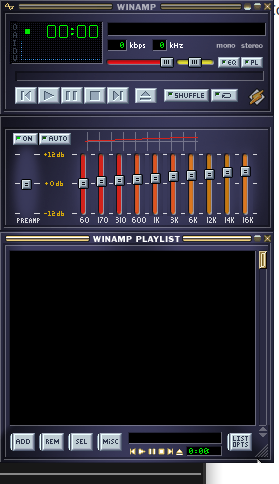 | 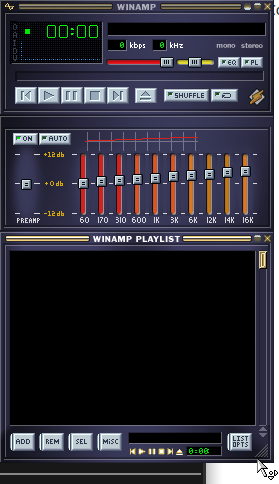 | ## API ```rust // new in egui::data::output pub struct CustomCursorImage { pub rgba: std::sync::Arc<[u8]>, pub size: [u16; 2], // matches winit's u16 to avoid lossy casts pub hotspot: [u16; 2], } // new field on PlatformOutput (skipped from serde — ephemeral) pub cursor_image: Option<CustomCursorImage>, // new method on Context ctx.set_cursor_image(Some(image)); // overrides cursor_icon for this frame ctx.set_cursor_image(None); // revert to cursor_icon ``` `Arc<[u8]>` is intentional: the integration dedupes by `Arc::as_ptr`, so reusing the same Arc across frames means the bitmap is only uploaded to the OS once per skin, not once per frame. ## Integration changes - `egui_winit::State::handle_platform_output_with_event_loop(window, Option<&ActiveEventLoop>, ...)` is a new method that threads the active event loop so it can call `event_loop.create_custom_cursor(...)`. - The legacy `handle_platform_output(window, ...)` delegates with `None` and silently drops `cursor_image`. **No existing callers break.** - The icon and bitmap paths are unified in a private `apply_cursor`. The no-flicker dedupe of the old `set_cursor_icon` is preserved on both paths. - If `CustomCursor::from_rgba` rejects the bitmap (bad dimensions, hotspot OOB, etc.), we log a warning and fall back to the icon path. - eframe's wgpu + glow integrations thread `&ActiveEventLoop` through `run_ui_and_paint` (glow already had it; wgpu needed one extra parameter) and call the new method. - Immediate viewports keep the old path because they're invoked from a `Context` callback that doesn't have an event loop reference. Custom cursors are a no-op in immediate viewports — acceptable since they're a niche path. ## Fallback semantics | backend / context | what happens | |--------------------------------|-------------------------------| | eframe wgpu/glow main viewport | bitmap displayed via OS | | eframe immediate viewport | falls back to `cursor_icon` | | eframe web | falls back to `cursor_icon` | | custom integrations not opted in | falls back to `cursor_icon` | | `from_rgba` returns `BadImage` | warning + falls back to icon | ## Verification - `cargo fmt --all -- --check` ✅ - `cargo clippy -p egui -p egui-winit -p eframe --all-targets --all-features -- -D warnings` ✅ - `cargo doc --lib --no-deps -p egui -p egui-winit -p eframe --all-features` ✅ - `cargo check -p egui --no-default-features --features serde` ✅ (validates the `serde(skip)` on `cursor_image`) - Interactive validation on Linux/Wayland with the OneAmp WSZ skin player — see screenshots above. I haven't run the full snapshot test suite (`scripts/check.sh`) because we're on Linux and the snapshots are macOS-rendered — happy to run it if you'd like. ## Notes Drafted per the contributing guide ("open a draft PR, you may get helpful feedback early"). Open to design feedback on: 1. Whether `CustomCursorImage` should live in `egui::viewport` rather than `egui::data::output`. 2. Whether the legacy `handle_platform_output` should grow `event_loop` directly (breaking) instead of getting a sibling method (non-breaking, what I did). 3. Whether to also wire it through eframe-web (probably not — `wasm-bindgen-cursor` would need its own path). --------- Co-authored-by: Claude Opus 4.7 (1M context) <noreply@anthropic.com>


eframe: the egui framework



eframe is the official framework library for writing apps using egui. The app can be compiled both to run natively (for Linux, Mac, Windows, and Android) or as a web app (using Wasm).
To get started, see the examples.
To learn how to set up eframe for web and native, go to https://github.com/emilk/eframe_template/ and follow the instructions there!
There is also a tutorial video at https://www.youtube.com/watch?v=NtUkr_z7l84.
For how to use egui, see the egui docs.
eframe defaults to using wgpu for rendering (with an option to change to glow), and on native it uses egui-winit.
To use on Linux, first run:
sudo apt-get install libxcb-render0-dev libxcb-shape0-dev libxcb-xfixes0-dev libxkbcommon-dev libssl-dev
You need to either use edition = "2024", or set resolver = "2" in the [workspace] section of your to-level Cargo.toml. See this link for more info.
You can opt-in to the using egui_glow for rendering by enabling the glow feature and setting NativeOptions::renderer to Renderer::Glow.
Alternatives
eframe is not the only way to write an app using egui! You can also try egui-miniquad, bevy_egui, egui_sdl2_gl, and others.
You can also use egui_glow and winit to build your own app as demonstrated in https://github.com/emilk/egui/blob/main/crates/egui_glow/examples/pure_glow.rs.
Limitations when running egui on the web
eframe and egui compiles to Wasm using either WebGPU (when available) or WebGL2 for rendering, and almost nothing else from the web tech stack. This has some benefits, but also produces some challenges and serious downsides.
- Rendering: Getting pixel-perfect rendering right on the web is very difficult.
- Search: you cannot search an egui web page like you would a normal web page.
- Bringing up an on-screen keyboard on mobile: there is no JS function to do this, so
eframefakes it by adding some invisible DOM elements. It doesn't always work. - Mobile text editing is not as good as for a normal web app.
- No integration with browser settings for colors and fonts.
- Accessibility: There is an experimental screen reader for
eframe, but it has to be enabled explicitly. There is no JS function to ask "Does the user want a screen reader?" (and there should probably not be such a function, due to user tracking/integrity concerns).eguisupports AccessKit, but as of early 2024, AccessKit lacks a Web backend.
In many ways, eframe is trying to make the browser do something it wasn't designed to do (though there are many things browser vendors could do to improve how well libraries like egui work).
The suggested use for eframe are for web apps where performance and responsiveness are more important than accessibility and mobile text editing.
Companion crates
Not all rust crates work when compiled to Wasm, but here are some useful crates have been designed to work well both natively and as Wasm:
Name
The frame in eframe stands both for the frame in which your egui app resides and also for "framework" (eframe is a framework, egui is a library).