<!--
Please read the "Making a PR" section of
[`CONTRIBUTING.md`](https://github.com/emilk/egui/blob/main/CONTRIBUTING.md)
before opening a Pull Request!

* Keep your PR:s small and focused.
* The PR title is what ends up in the changelog, so make it descriptive!
* If applicable, add a screenshot or gif.
* If it is a non-trivial addition, consider adding a demo for it to
`egui_demo_lib`, or a new example.
* Do NOT open PR:s from your `master` branch, as that makes it hard for
maintainers to test and add commits to your PR.
* Remember to run `cargo fmt` and `cargo clippy`.
* Open the PR as a draft until you have self-reviewed it and run
`./scripts/check.sh`.
* When you have addressed a PR comment, mark it as resolved.

Please be patient! I will review your PR, but my time is limited!
-->

* [x] I have followed the instructions in the PR template

At low apha values, premultiplied colors lose precision.
This PR makes the color picker use unmultiplied colors internally.

Before:


https://github.com/user-attachments/assets/4617a355-daa9-4911-86e6-518ac6867014

After:


https://github.com/user-attachments/assets/d9681b01-50d8-418e-b5a5-79b4bd1bbddf
## Summary

Adds two paired API entry-points that let an integration target a
specific monitor at viewport creation time, or move an existing viewport
to a different monitor at runtime, in a way that works portably on
Wayland.

```rust
// At creation
ViewportBuilder::default()
    .with_inner_size([1920.0, 1080.0])
    .with_monitor(playfield_idx)         // ← new
    .with_decorations(false)

// Or at runtime
ctx.send_viewport_cmd(egui::ViewportCommand::SetMonitor(idx));
```

Both route through winit's
`Fullscreen::Borderless(Some(MonitorHandle))`, which is the only
portable mechanism that:
- targets a specific output on **Wayland** (where there is no global
`OuterPosition`)
- avoids the **Mutter race** where `OuterPosition` is dropped before the
window is mapped (X11/Wayland-Mutter)
- works the same way on Windows and macOS

`with_position` and `with_outer_position` continue to work for cases
where the integration *does* know the absolute pixel coordinates of each
monitor and is on a platform where they are honored. `with_monitor` is
the high-level alternative when you just want "show this window on
output N, borderless fullscreen."

## Why this matters

Multi-monitor borderless setups (kiosks, pinball cabinets, museum
installs, embedded panels) need each window to land on a specific
physical display. Without `with_monitor`:

- On Wayland, you can't move a window to a chosen output at all — the
compositor decides. There's no `OuterPosition` API.
- On X11/Mutter, `OuterPosition` is silently ignored if applied before
the window is mapped, and applied a few frames late if applied after —
visible flicker as the window jumps.
- Polling `monitor.position()` then sending `OuterPosition` in a retry
loop is the workaround pattern, but fragile and racy.

Routing through `Fullscreen::Borderless(Some(MonitorHandle))` is the
same code path winit's own examples use for monitor-targeted fullscreen,
just exposed at the egui ViewportBuilder level.

## Implementation

- `crates/egui/src/viewport.rs` — adds `monitor: Option<usize>` to
`ViewportBuilder`, the `with_monitor(usize)` builder method, and the
`ViewportCommand::SetMonitor(usize)` variant.
- `crates/egui-winit/src/lib.rs` — both at viewport creation and on
`SetMonitor`, look up the monitor by index in `available_monitors()` and
apply `Fullscreen::Borderless(Some(handle))`. Index out of range is a
no-op (with a `log::warn!`), matching how unknown values are handled
elsewhere in the file.

73 lines added, 1 modified. No public API removed or changed.

## Test plan

- [x] `cargo build -p egui -p egui-winit` clean
- [x] `cargo clippy -p egui -p egui-winit --all-features -- -D warnings`
clean
- [x] `cargo fmt -p egui -p egui-winit --check` clean
- [ ] Manual: tested on Linux X11 (Mutter), Linux Wayland (Mutter &
KWin), Windows 11. Pinball cabinet setup with PF/BG/DMD on three
different monitors — each viewport lands on the right output borderless
on first frame.
- [ ] Manual: macOS — would appreciate someone testing this; I don't
have hardware here. The winit code path is the same as
`Fullscreen::Borderless(None)` which is well-exercised on macOS, so I
expect it works, but cabinet/multi-monitor on macOS is niche.

## Background

This is the third of three small upstream-able pieces extracted from the
closed [PR #8113](https://github.com/emilk/egui/pull/8113) (viewport
rotation, declined as too niche / too much surface). The rotation logic
itself shipped as the standalone
[`egui-rotate`](https://crates.io/crates/egui-rotate) crate. The
remaining two integration touch-points needed for kiosk/cabinet setups
are:

- [PR #8138](https://github.com/emilk/egui/pull/8138) —
`App::transform_primitives` + `App::post_platform_output` hooks
(general-purpose post-tessellation / post-platform-output hooks)
- [PR #8127](https://github.com/emilk/egui/pull/8127) —
`Key::ShiftLeft/Right` + `IntlBackslash` physical key variants
- **This PR** — `with_monitor` / `SetMonitor`

Each is independently useful. None depend on the others.

🤖 Drafted with [Claude Code](https://claude.com/claude-code)
<!--
Please read the "Making a PR" section of
[`CONTRIBUTING.md`](https://github.com/emilk/egui/blob/main/CONTRIBUTING.md)
before opening a Pull Request!

* Keep your PR:s small and focused.
* The PR title is what ends up in the changelog, so make it descriptive!
* If applicable, add a screenshot or gif.
* If it is a non-trivial addition, consider adding a demo for it to
`egui_demo_lib`, or a new example.
* Do NOT open PR:s from your `master` branch, as that makes it hard for
maintainers to test and add commits to your PR.
* Remember to run `cargo fmt` and `cargo clippy`.
* Open the PR as a draft until you have self-reviewed it and run
`./scripts/check.sh`.
* When you have addressed a PR comment, mark it as resolved.

Please be patient! I will review your PR, but my time is limited!
-->

Fixes a small typo
* [x] I have followed the instructions in the PR template
<!--
Please read the "Making a PR" section of
[`CONTRIBUTING.md`](https://github.com/emilk/egui/blob/main/CONTRIBUTING.md)
before opening a Pull Request!
* Keep your PR:s small and focused.
* The PR title is what ends up in the changelog, so make it descriptive!
* If applicable, add a screenshot or gif.
* If it is a non-trivial addition, consider adding a demo for it to
`egui_demo_lib`, or a new example.
* Do NOT open PR:s from your `master` branch, as that makes it hard for
maintainers to test and add commits to your PR.
* Remember to run `cargo fmt` and `cargo clippy`.
* Open the PR as a draft until you have self-reviewed it and run
`./scripts/check.sh`.
* When you have addressed a PR comment, mark it as resolved.
Please be patient! I will review your PR, but my time is limited!
-->
* Closes#8032
* [x] I have followed the instructions in the PR template
It includes:
* Fix for `ScrollArea` when `scroll_to_*` could be ignored when
`stick_to_bottom(true)` was active and the viewport was already stuck to
the bottom.
* The fix is by making explicit per-axis scroll movement take priority
over sticky-end snapping for that frame, and avoid immediately
re-marking animated scrolls as still stuck.
* I've also added a regression test for this issue to ensure it will be
caught on further code changes.
The code snippets form the original issue can be used for testing here
as well
Co-authored-by: Emil Ernerfeldt <emil.ernerfeldt@gmail.com>
Previously, the doc for `Ui::scope_builder` read

> Create a child, add content to it, and then allocate only what was
used in the parent `Ui`.

which I understood as meaning that "only what was used in the parent
`UI`" would be allocated (in the child or parent), which makes no sense
(in either case).

I rewrote it and some related docs.

Co-authored-by: Emil Ernerfeldt <emil.ernerfeldt@gmail.com>
* Closes <https://github.com/emilk/egui/issues/4491>
* [x] I have followed the instructions in the PR template

Lets you create an `EhttpLoader` with arbitrary headers like so:

```rust
cc.egui_ctx.add_bytes_loader(std::sync::Arc::new(
    egui_extras::loaders::http_loader::EhttpLoader::default().with_headers(&[
        ("User-Agent", "foo"),
    ])
));
```

I'm not sure if there are any problems with installing a second
`EhttpLoader` (in addition to the one installed by default when using
`egui_extras::install_image_loaders(&cc.egui_ctx)`. But I wasn't
sure how else to pass in configuration options to
`install_image_loaders`.
* Follows https://github.com/emilk/egui/pull/8199

This makes the animation of the collapsing panel a bit smoother, by
taking into account the spacing between the header and the body.
`ab_glyph` would output coverage values, but `vello` outputs RGBA. So
the old name was a misnomer.

I also suspect our default values are wrong, but I need to investigate
that more properly in a separate PR.
This changes the monitor selection used when restoring a persisted
window position.

Currently, `egui-winit` picks a monitor by checking whether the saved
window position fits inside a loose monitor range. This can choose the
wrong monitor when a saved window rectangle slightly overlaps another
monitor.

My failure case was on Windows with two monitors:
- primary monitor on the right
- secondary monitor on the left
- window maximized on the primary monitor
- persisted outer position was slightly negative, e.g. `x = -8`, because
of the invisible window border

That position matched both monitor ranges, so the restored maximized
window could
open on the secondary monitor instead of the primary one.

This PR picks the monitor with the largest overlap with the saved window
rectangle instead.

Related note: probably the best solution would be to save the normal
window position when maximized, so that when unmaximizing, the window
would get restored to the previous state. It's mentioned in this comment
https://github.com/emilk/egui/issues/3494#issuecomment-1986985211. I
tried doing that in
[fix-windows-maximized-restore-placement](https://github.com/YelovSK/egui/tree/fix-windows-maximized-restore-placement),
and it works, but it requires adding windows-sys as a dependency to call
a relevant winapi, so that's probably not the right solution. Winit
doesn't seem to provide an API that would return this information.

* [x] I have followed the instructions in the PR template

---------

Co-authored-by: Emil Ernerfeldt <emil.ernerfeldt@gmail.com>
Current behavior fails when translating file uris that contain windows
UNC paths. This commit attempts to fix that behavior by looking at the
hostname attribute of the uri and changing behavior if the hostname is
present.

* Closes <https://github.com/emilk/egui/issues/8161>
* [x] I have followed the instructions in the PR template
The three methods for showing a `Panel` are now:

* `panel.show`: always show the panel.
* `panel.show_collapsible`: show or hide the panel, with a slide
animation in between.
* `Panel::show_switched`: animate between two different panels: a
thin/collapsed one and a thick/expanded one.
* Closes https://github.com/emilk/egui/pull/7254

You can now drag-to-close a panel. Also drag-to-expand panels.

This is a breaking change: the animated panel functions now take a
`open: &mut bool` instead of `open: bool`.

This is only enabled for resizable panels
## What
Adds a way for apps to push an RGBA bitmap as the OS cursor — the
missing companion to `Context::set_cursor_icon`. The integration
translates it into a real `winit::CustomCursor`, so the cursor is drawn
by the compositor and can extend past the egui window edge like any
native cursor.
## Why
Apps with custom-shaped windows (Winamp-style skins, themed launchers,
kiosk apps) currently have no clean way to display a custom cursor:
- `CursorIcon` is limited to the standard system enum.
- Painting the cursor sprite via `egui::Painter` works inside the canvas
but gets clipped at the window edge — the bottom/right of the cursor
disappears the moment the pointer is near the boundary, and there's no
way to render onto the desktop area exposed by a
transparent/region-shaped window.
`winit` 0.30+ already supports `CustomCursor::from_rgba` +
`ActiveEventLoop::create_custom_cursor`, but `egui-winit` doesn't
surface it. This PR exposes it through egui.
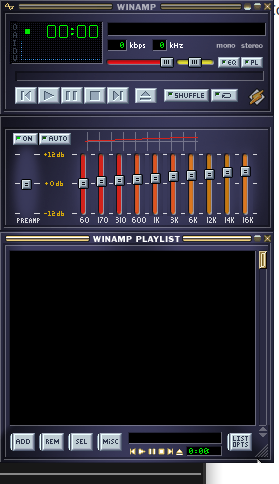
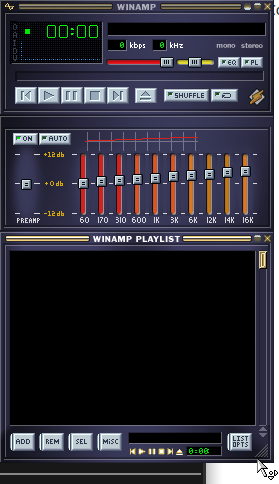
### Visual demonstration
Driving use case: a Winamp WSZ skin player
([all3f0r1/oneamp](https://github.com/all3f0r1/oneamp)) with a
transparent + region-shaped window where the skin ships its own `.cur`
files. The bottom-right corner of the playlist exposes the resize cursor
— notice how it gets clipped at the window edge in the painter-based
approach.
| Before (cursor painted via `egui::Painter`) | After (cursor pushed via
`set_cursor_image`) |
| --- | --- |
| 
| 
|
## API
```rust
// new in egui::data::output
pub struct CustomCursorImage {
pub rgba: std::sync::Arc<[u8]>,
pub size: [u16; 2], // matches winit's u16 to avoid lossy casts
pub hotspot: [u16; 2],
}
// new field on PlatformOutput (skipped from serde — ephemeral)
pub cursor_image: Option<CustomCursorImage>,
// new method on Context
ctx.set_cursor_image(Some(image)); // overrides cursor_icon for this frame
ctx.set_cursor_image(None); // revert to cursor_icon
```
`Arc<[u8]>` is intentional: the integration dedupes by `Arc::as_ptr`, so
reusing the same Arc across frames means the bitmap is only uploaded to
the OS once per skin, not once per frame.
## Integration changes
- `egui_winit::State::handle_platform_output_with_event_loop(window,
Option<&ActiveEventLoop>, ...)` is a new method that threads the active
event loop so it can call `event_loop.create_custom_cursor(...)`.
- The legacy `handle_platform_output(window, ...)` delegates with `None`
and silently drops `cursor_image`. **No existing callers break.**
- The icon and bitmap paths are unified in a private `apply_cursor`. The
no-flicker dedupe of the old `set_cursor_icon` is preserved on both
paths.
- If `CustomCursor::from_rgba` rejects the bitmap (bad dimensions,
hotspot OOB, etc.), we log a warning and fall back to the icon path.
- eframe's wgpu + glow integrations thread `&ActiveEventLoop` through
`run_ui_and_paint` (glow already had it; wgpu needed one extra
parameter) and call the new method.
- Immediate viewports keep the old path because they're invoked from a
`Context` callback that doesn't have an event loop reference. Custom
cursors are a no-op in immediate viewports — acceptable since they're a
niche path.
## Fallback semantics
| backend / context | what happens |
|--------------------------------|-------------------------------|
| eframe wgpu/glow main viewport | bitmap displayed via OS |
| eframe immediate viewport | falls back to `cursor_icon` |
| eframe web | falls back to `cursor_icon` |
| custom integrations not opted in | falls back to `cursor_icon` |
| `from_rgba` returns `BadImage` | warning + falls back to icon |
## Verification
- `cargo fmt --all -- --check` ✅
- `cargo clippy -p egui -p egui-winit -p eframe --all-targets
--all-features -- -D warnings` ✅
- `cargo doc --lib --no-deps -p egui -p egui-winit -p eframe
--all-features` ✅
- `cargo check -p egui --no-default-features --features serde` ✅
(validates the `serde(skip)` on `cursor_image`)
- Interactive validation on Linux/Wayland with the OneAmp WSZ skin
player — see screenshots above.
I haven't run the full snapshot test suite (`scripts/check.sh`) because
we're on Linux and the snapshots are macOS-rendered — happy to run it if
you'd like.
## Notes
Drafted per the contributing guide ("open a draft PR, you may get
helpful feedback early"). Open to design feedback on:
1. Whether `CustomCursorImage` should live in `egui::viewport` rather
than `egui::data::output`.
2. Whether the legacy `handle_platform_output` should grow `event_loop`
directly (breaking) instead of getting a sibling method (non-breaking,
what I did).
3. Whether to also wire it through eframe-web (probably not —
`wasm-bindgen-cursor` would need its own path).
---------
Co-authored-by: Claude Opus 4.7 (1M context) <noreply@anthropic.com>
## Related
* https://github.com/emilk/egui/pull/5851
* https://github.com/emilk/egui/pull/7988

## What
We want to make it easier to understand the lineage of a `Id` (which is
the parent `Id`, and the parent of that, etc?)

As a first step of that, we want to clarify the different between a
globally unique `Id`, and an `IdSalt`

I also introduced the `AsId` and `AsIdSalt` traits, which are
implemented of anything that implements `Hash` and `Debug`. The `Debug`
half of that is unused here, but will later be used in `Debug` builds to
produce a proper tree.
* Part of https://github.com/emilk/egui/issues/8180

So far, you've been able to move any `egui::Window` by dragging anywhere
on it. This makes sense on touch screens with thick fingers, but less so
on non-touch-screens.

With this PR, you can now control it with a new enum `WindowDrag`
* Part of https://github.com/emilk/egui/issues/8180

Drag-to-scroll is a must-have on touch-screens, since there is no other
way to scroll.

However, when you are not on a touch screens, it is more surprising than
useful.
### Related
* Closes#8134.
* Related to #5136.
Possibly fixes:
* #8123
* #5145
### What
We did not properly handle the variants of
[`CurrentSurfaceTexture`](https://docs.rs/wgpu/latest/wgpu/enum.CurrentSurfaceTexture.html)
and always returned `SkipFrame`.
Because of this `egui` could end up in a state where frames are always
skipped after observing `Outdated`, without the chance to recover
(unless an event arrives from the outside).
> [!NOTE]
> This is not Wayland-specific, but could happen on all platforms. It
just happens frequently for Wayland compositors that directly resize a
window after creation (such as tiling/scrolling compositors like
`hyprland` and `niri`).
This PR improves this by separating the code paths for `Outdated` and
`Lost`, to help recover from those events.
## Related
* https://github.com/emilk/egui/issues/8043
* Introduced in #8103


## What
I noticed resizing the native winit window was really choppy and bad on
macOS, and this was the readon
* part of #7264
* based on https://github.com/emilk/egui/pull/8152

The resize fix allows use to really simplify how the Window Titlebar is
rendered. Previously it was using some complex flow to calculate and
allocate the height first and then render it later once we knew the
windows final width.

Since now windows can't shrink past their minimum content widths, I can
just show the titlebar inline with the regular content, just outside of
the `Resize` container so that it is always visible.

This does change what the size of a window means. Before, size was just
the size of the contents, while now size (e.g. via min_height) will
include the Frames margin and outline, title bar and the contents.
Also, the window label now truncates as you shrink the window (meaning
windows can now be smaller than their label allows).

---------

Co-authored-by: lucasmerlin <8009393+lucasmerlin@users.noreply.github.com>
This allows the base egui crate to run on platforms without 64 bit
atomics

* Addresses <https://github.com/emilk/egui/issues/7692>, but does not
address the `egui_extras` crate

* [x] I have followed the instructions in the PR template
* Closes part of <https://github.com/emilk/egui/issues/3284>

Add a class system toward a CSS-like styling.

Widget and Ui can implement the trait `HasClasses` which can be used
later by theme engines to compute a style based on the set of classes
the component has.

---------

Co-authored-by: adrien <221212@umons.ac.be>
Co-authored-by: Adrien Zianne <adrien@iq002.ipa.iqrypto.com>
Co-authored-by: lucasmerlin <hi@lucasmerlin.me>
Fixes some bugs that happen randomly when resizing horizontal_wrapped
texts:


https://github.com/user-attachments/assets/141392d2-0239-465a-ba7b-c864f7823319

Adds regression tests (I enjoy using claude to fix these bugs, first
have it create a minimal repro test case, then fix the bug by iterating
until it figures out a fix).
* [x] I have followed the instructions in the PR template

```
+ echo 'All checks passed.'
All checks passed.
```

I had to update `.png`'s for tests to pass, but I guess it's specific to
my laptop.

---------

Co-authored-by: Emil Ernerfeldt <emil.ernerfeldt@gmail.com>



